Businesses no longer have the luxury of waiting days for documents to arrive in someone’s inbox, get printed, signed, scanned, and sent back. That process feels outdated now.
Whether you’re closing a client deal, onboarding employees, signing rental agreements, or approving contracts across different countries, electronic signature software has become an everyday business tool.
The good news? There are dozens of platforms available.
The difficult part is choosing the right one.
Some are built for freelancers. Others focus on enterprise compliance. A few emphasize automation, while others simply make document signing incredibly fast.
To make your decision easier, we’ve compared the best electronic signature solutions available in 2026 based on security, ease of use, integrations, pricing, compliance, and overall user experience.
1. DocuSign

DocuSign remains the industry leader for a reason.
Millions of businesses trust it for everything from simple agreements to enterprise-scale contract management. The platform offers advanced workflow automation, legally binding signatures, audit trails, identity verification, and integrations with hundreds of business applications.
Large organizations especially appreciate its compliance certifications, global recognition, and mature ecosystem.
Key Features
- Legally binding electronic signatures
- AI-powered agreement management
- Automated workflows
- Advanced authentication
- Cloud integrations
- Mobile signing
- Detailed audit trails
Best For: Enterprises and large organizations
2. QuickSigner

Sometimes you don’t need complicated software with dozens of menus. You just want to upload a document, send it, collect signatures, and move on.
That’s exactly where QuickSigner stands out.
The platform focuses on making digital document signing simple, fast, and secure without overwhelming users with unnecessary complexity. Whether you’re a startup founder, freelancer, HR manager, legal consultant, or growing business, QuickSigner helps eliminate paperwork while keeping every signature legally trackable.
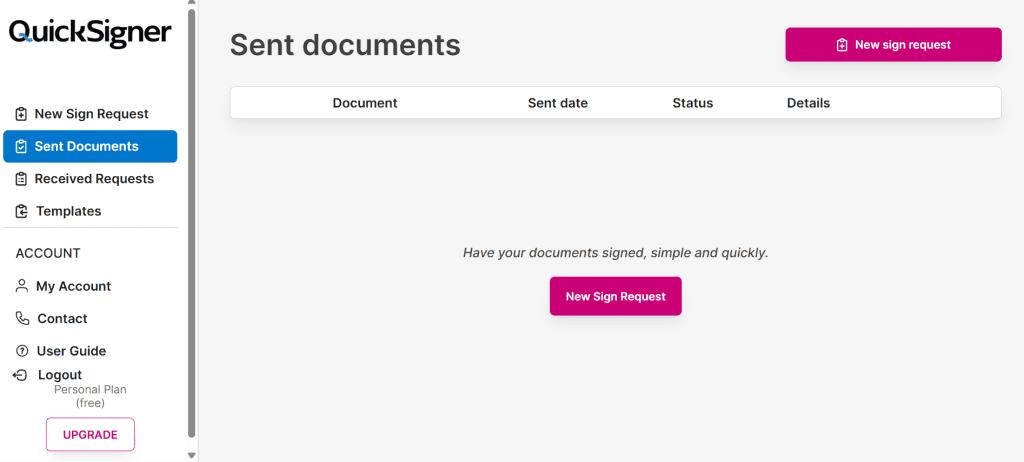
One thing many users appreciate is how quickly they can prepare documents for signing. Upload the file, place signature fields, invite recipients, and you’re done in just a few minutes.
For developers, QuickSigner also offers a powerful eSignature API that lets you integrate document signing directly into your own applications, allowing users to sign documents without ever leaving your app.
Security hasn’t been ignored either. Every signed document includes encrypted storage, audit history, and secure authentication to help businesses maintain compliance and transparency.
Another advantage is its clean interface. New users usually don’t need lengthy training sessions before getting started.
Key Features
- Fast online document signing
- Secure encrypted document storage
- Complete audit trail
- Multiple signer support
- Simple drag-and-drop document preparation
- Cloud-based access
- Paperless workflow management
- eSignature API
- User-friendly dashboard
Website: https://www.quicksigner.com/
Best For: Small businesses, startups, HR teams, agencies, consultants, and professionals looking for a straightforward electronic signature solution.
3. Adobe Acrobat Sign
Adobe has been trusted for documents for decades.
Acrobat Sign naturally fits into that ecosystem. If your organization already uses Adobe Acrobat or Microsoft 365, implementation becomes relatively seamless.
The platform supports legally compliant digital signatures while offering excellent document management capabilities.
Key Features
- PDF integration
- Enterprise workflows
- Microsoft integrations
- Cloud storage support
- Mobile signing
- Compliance management
Best For: Adobe ecosystem users
4. Dropbox Sign
Formerly known as HelloSign, Dropbox Sign emphasizes simplicity.
Its interface feels clean and approachable, making it a great option for startups and growing businesses that don’t need enterprise-level complexity.
Key Features
- Electronic signatures
- Team management
- API support
- Template creation
- Dropbox integration
Best For: Small businesses
5. PandaDoc
PandaDoc is much more than an eSignature platform.
Businesses can create proposals, quotes, contracts, approvals, and collect payments from one dashboard.
Sales teams particularly benefit from its document analytics and CRM integrations.
Key Features
- Proposal builder
- Electronic signatures
- CRM integrations
- Payment collection
- Templates
- Document analytics
Best For: Sales teams
6. SignNow
SignNow offers a strong balance between affordability and enterprise functionality.
It supports reusable templates, team collaboration, workflow automation, and API integrations without requiring a massive budget.
Key Features
- Workflow automation
- Team collaboration
- Bulk sending
- API access
- Mobile support
Best For: Growing businesses
7. Zoho Sign
Businesses already using the Zoho ecosystem will find Zoho Sign a natural extension.
It integrates with Zoho CRM, Zoho Books, Zoho People, and several other business applications.
Key Features
- Zoho ecosystem integration
- Audit trails
- Templates
- Multi-user workflows
- Secure authentication
Best For: Zoho users
8. OneSpan Sign
OneSpan Sign specializes in high-security digital transactions.
Banks, insurance companies, healthcare providers, and regulated industries often choose it because of its advanced authentication capabilities and regulatory compliance.
Key Features
- Advanced authentication
- Enterprise security
- Regulatory compliance
- Cloud deployment
- Workflow automation
Best For: Financial institutions and regulated industries
9. Nitro Sign
Nitro Sign combines PDF productivity with electronic signatures in a single platform.
Businesses that frequently work with PDFs often appreciate the integrated editing and signing experience.
Key Features
- PDF editing
- Electronic signatures
- Cloud collaboration
- Audit logs
- Secure storage
Best For: PDF-heavy workflows
10. SignEasy
SignEasy focuses on mobility.
Whether you’re traveling, meeting clients, or working remotely, documents can be signed from smartphones, tablets, or laptops with minimal effort.
Key Features
- Mobile-first experience
- Offline signing
- Cloud synchronization
- Team collaboration
- Secure signatures
Best For: Remote professionals
How to Choose the Right Electronic Signature Software
Before selecting an electronic signature platform, consider these factors:
- Security and encryption standards
- Legal compliance (ESIGN, UETA, eIDAS)
- Ease of use
- Workflow automation
- Third-party integrations
- Mobile accessibility
- Pricing and scalability
- Customer support
The best software isn’t always the one with the longest feature list. It’s the one that fits how your business actually works.
Final Thoughts
Electronic signature software has become essential for modern businesses. It saves time, reduces paperwork, improves collaboration, and accelerates approvals without sacrificing security.
While enterprise organizations may lean toward established platforms like DocuSign or Adobe Acrobat Sign, businesses looking for a fast, user-friendly, and secure signing experience should definitely consider QuickSigner. Its straightforward interface, paperless workflow, and secure document management make it a strong choice for professionals who value efficiency without unnecessary complexity.
As organizations continue shifting toward digital-first operations in 2026, adopting the right electronic signature solution is no longer just a convenience—it’s a competitive advantage.

