Localization always sounds easy in the beginning.
“We will just translate it later.”
That’s what most teams say. And for a while, it works. You build features. Add text. Push updates. Everything moves fast.
Then one day… you decide to go global.
And suddenly, things get messy.
The Moment Localization Becomes a Problem
Picture this.
You’ve just added a new feature. It’s ready. Clean UI. Nice copy. Everything looks good.
But now you need it in 4–5 languages.
So you export your strings. Upload them somewhere. Wait for translations. Download files. Fix formatting. Maybe something breaks. Maybe something gets missed.
You fix it. Push again.
It works… but it’s slow. And honestly, a bit frustrating.
Now imagine doing this every time you update your product.
Yeah. Not fun.
Where Doloc Steps In (and why it feels different)
Doloc doesn’t try to manage your whole localization process. It doesn’t give you dashboards. Or workflows. Or complicated tools.
Instead, it asks a simple question:
What if localization was just one step?
And that’s exactly how it works.
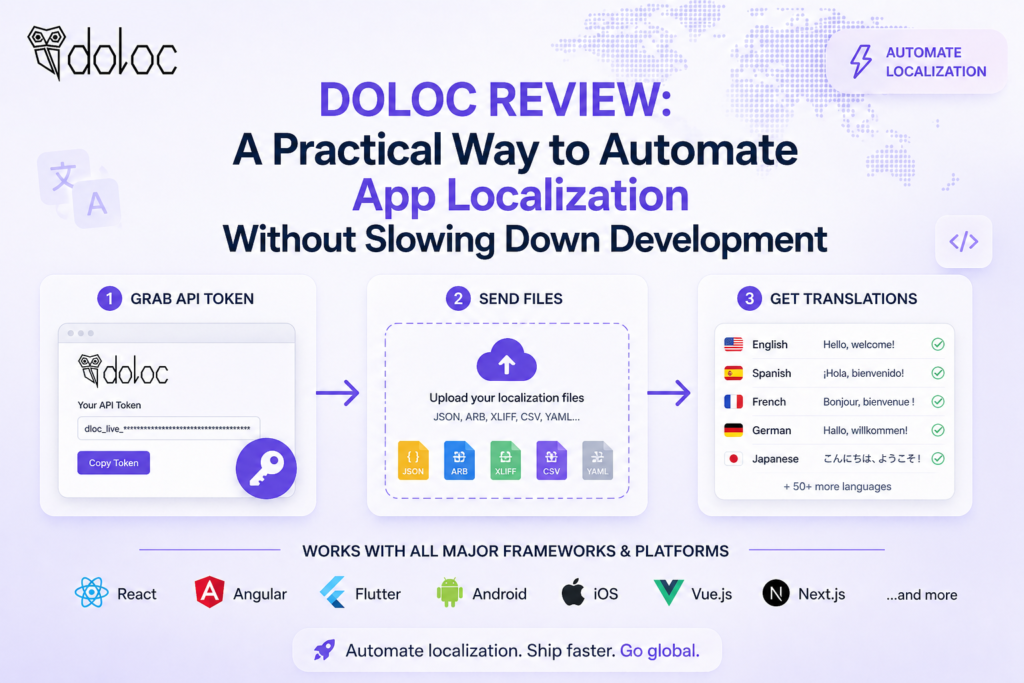
You send your files.
It returns them translated.
That’s it.
No extra layers. No jumping between tools. No waiting around.
At first, it feels too simple. But then you use it… and realize this is probably how it should’ve been from the start.
A Real-World Flow (How it actually feels in use)
Let’s say you’re working on your app late at night. You’ve updated some UI text. Added new buttons. Maybe a new feature.
Everything is ready. Except translations. Normally, this is where you pause. Maybe delay the release.
With Doloc?
You run a simple command. Something like a curl request or script inside your workflow.
Files go in.
Translated files come out.
You plug them back into your project. Done.
No waiting. No coordination. No “we’ll do it tomorrow.”
It feels… smooth. Almost like localization isn’t a separate task anymore.
Key Features
1. Instant translations
This is the core of Doloc.
You don’t wait hours or days. You get results in seconds.
That changes how teams work. You stop planning around localization delays. You just do it on the spot.
2. Works inside your workflow
You don’t log into anything. No dashboards. Run it locally. Or inside your CI/CD pipeline. So whenever your code updates, translations can update too. Automatically.
No one has to remember it. Which is honestly a big deal.
3. Keeps your file structure intact
This one is underrated. Many tools mess up formatting. You get broken JSON. Weird XML issues. Missing keys.
Doloc keeps everything clean. Same structure. Same format.
You don’t fix things after. You just use them.
4. Context-aware translations
Doloc doesn’t just translate word by word.
It looks at your existing text. Tries to keep the tone consistent. Keeps things aligned across your app.
Is it perfect? Not always.
But it’s good enough for most use cases. And way faster than manual workflows.
5. Supports common formats
You can send:
- JSON
- XLIFF (1.2 & 2.0)
- Android XML
- ARB / Properties files
So most modern apps are covered without extra setup.
6. Works for multiple languages without extra cost
You want 2 languages? Fine.
You want 10? Still fine.
Pricing doesn’t increase based on how many languages you translate into.
That’s actually rare. And useful if you’re planning to scale globally.
7. No unnecessary features
No dashboards. No project management. No team workflows.
At first, this might feel like something is missing.
But after using it, you realize… nothing important is missing.
It just does the job. And gets out of the way.
8. Framework & Platform Compatibility
This makes it a practical choice for teams managing multiple platforms at once.
One of the strongest advantages of Doloc is its flexibility across different tech stacks. Whether you are building a web or mobile app, it integrates smoothly with:
- Frontend frameworks like React and Angular
- Cross-platform solutions such as Flutter
- Native environments like Android
Pricing (simple, no surprises)
Doloc keeps pricing clean. No complicated tiers.
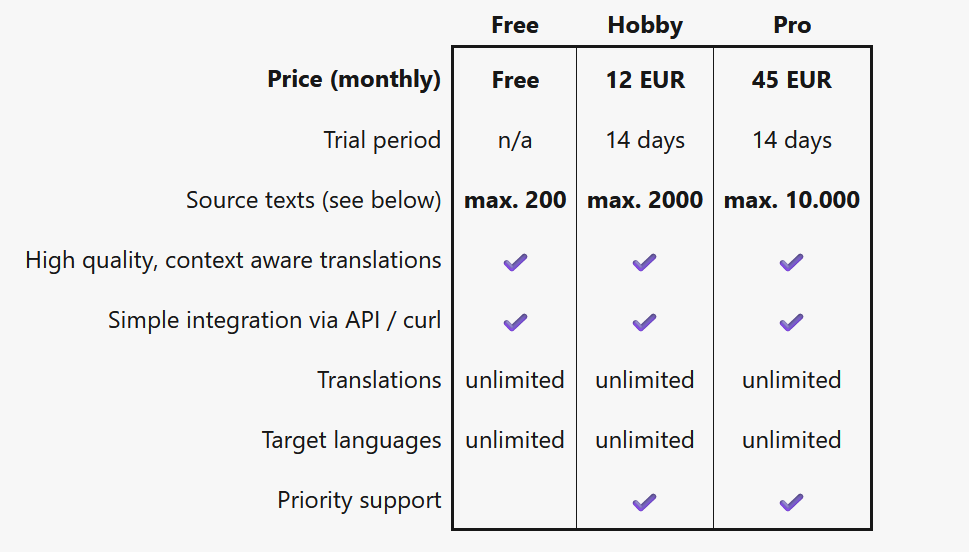
- Free plan → up to 100 source texts
- Hobby plan → €12/month (up to 2,000 texts)
- Pro plan → €45/month (up to 10,000 texts)
All plans include:
- API access
- Unlimited languages
- Same core features
So you are not paying more just because you expand.
That makes it easier for startups and growing teams.
Where Doloc actually helps the most
This is important.
Doloc is not trying to replace full translation teams. Or complex localization platforms.
It’s built for speed. And simplicity.
So it works best when:
- You ship updates frequently
- You want instant translations
- You don’t want extra tools
- You prefer automation over manual workflows
In these cases, it feels almost perfect.
Where it might fall short
Let’s be fair.
Doloc is not for everyone.
- No dashboard → some teams prefer visual tools
- No manual control → not ideal for high-precision human translations
- Not beginner-friendly → non-technical users might struggle a bit
So yeah, there are some trade-offs.
But those trade-offs are intentional.
How It Works (and why it feels almost too easy)
This is probably the part where most tools get complicated.
Doloc doesn’t.
It keeps things… surprisingly simple.
1. Keep your current localization process
Nothing changes here. And that’s the point. You don’t migrate. Don’t rebuild anything. No new system to learn.
Whatever you’re already using—keep it. Your extraction tools. Your files. Your setup.
Doloc just fits in.
It works with:
- XLIFF
- JSON
- ARB
- Android XML
- Properties files
So yeah, most projects are already compatible.
No friction at the start. Which is rare.
2. Add one translation call after extraction
This is where Doloc actually comes in. After you extract your strings… you add one step.
Just one. A simple API call. Can be local. Can be inside CI/CD. Your choice.
3. Receive ready-to-commit translations in seconds
Now the good part.Doloc sends back your translated files. Same format. Same structure. Nothing breaks.You open the file. Check the diff. Looks good (most of the time it does).
Then you commit it. Push your code. Release.
Done.
No waiting. No “we’ll review later”. No delays.
Why Doloc feels like a “modern” tool
Most localization tools were built for older workflows.
They assume:
- Teams move slower
- Translations take time
- Manual steps are normal
Doloc doesn’t follow that idea.
It’s built for:
- Fast releases
- Continuous updates
- Developer-first workflows
Instead of managing localization, you automate it completely.
That shift is what makes it interesting.
Who should actually use Doloc
Doloc makes the most sense if you are:
- A developer building multilingual apps
- A startup trying to go global quickly
- A SaaS team pushing frequent updates
- Someone tired of manual translation workflows
If that sounds like you, Doloc fits naturally.
If you need heavy collaboration, approvals, human review cycles… maybe not.
Final Thoughts
Doloc is one of those tools that doesn’t try too hard. No flashy UI. No complex system. No long onboarding. It just solves one problem.
And it solves it well.
You send your files. You get translations. You move on.
That’s it.
Is it perfect? No.
Is it practical? Yes. Very.
And in most real-world scenarios, practicality wins.
If you care about speed, simplicity, and keeping your workflow clean… Doloc is definitely worth trying.
Because sometimes, the best tools are the ones you barely notice.
They just work.

