AI assistants are getting smarter. They can answer questions, write emails, summarize documents, and help with everyday tasks. But there is one thing that still feels frustrating. You often need to leave the chat, open another app, and finish the job yourself.
Imagine telling your phone to check your notifications, summarize important messages, and adjust your brightness without manually opening several menus. Sounds useful, right?
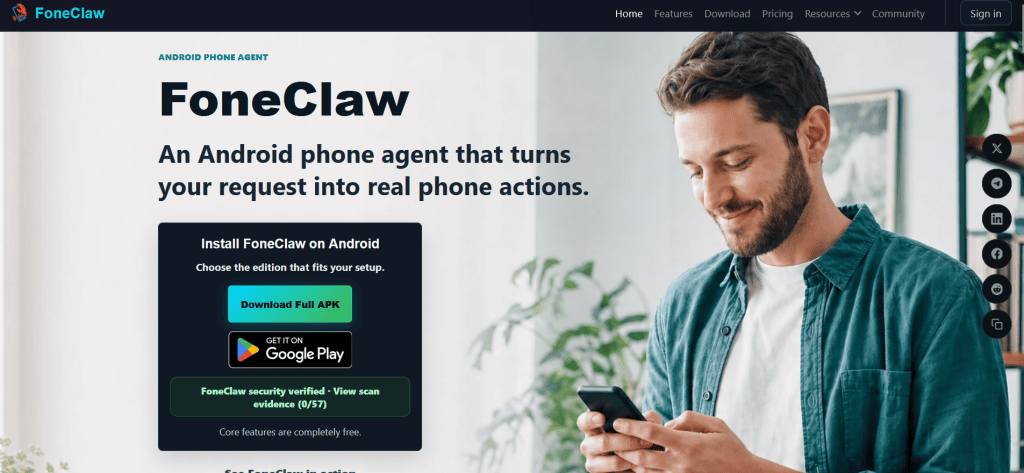
That’s the idea behind FoneClaw. It is an AI-powered Android phone assistant designed to do more than simply provide answers. It can perform supported actions directly on your phone, using natural-language commands.
In this FoneClaw review, we’ll look at its main features, practical benefits, pricing, and limitations to help you decide whether it’s worth trying.
What Is FoneClaw?
FoneClaw is an Android AI agent that turns everyday requests into actions on your device. Instead of giving you instructions and leaving you to follow them, it can use built-in tools to perform supported tasks.
For example, you could ask it to check your phone’s battery and storage, summarize recent SMS messages, change screen brightness, or help you navigate to a location. It can also handle certain tasks involving email, calendars, connectivity, and other supported functions.
The process is fairly straightforward. You give a command by typing or speaking, the configured AI model works out the steps, and FoneClaw selects the relevant tools to complete the task.
It is designed for Android 9 and later, and root access isn’t required. The project is also publicly available on GitHub, which gives technically minded users an opportunity to inspect its implementation and development.
One thing worth mentioning: FoneClaw isn’t a phone manufacturer or a replacement for Android itself. It works as an additional layer that helps you interact with supported phone functions.
Key Features of FoneClaw
1. AI-Powered Phone Control
This is probably the main reason to try FoneClaw.
Most AI chatbots are good at explaining how to do something. FoneClaw aims to take the next step by performing supported actions on the device.
You can request changes to settings, check device information, manage certain connections, and work with supported apps. Depending on the task, it may complete several steps in sequence.
Think about a busy morning. You have notifications waiting, your battery is running low, and you need to leave home soon. Instead of checking everything separately, you could ask FoneClaw for a phone status report and a summary of important notifications.
Small things, perhaps. But they can save time when repeated every day.
2. Smart SMS and Notification Summaries
Nobody enjoys scrolling through a long list of messages to find one important detail.
FoneClaw can summarize supported SMS conversations and notifications, helping you understand what needs attention. You can request a summary for a particular period or ask it to organize messages by contact.
This could be useful for people who receive frequent messages throughout the day. Rather than opening every conversation, you get a more compact overview.
Of course, the results depend on the information available to the assistant and the permissions you grant. You should also review important details instead of assuming every AI-generated summary is perfectly accurate.
3. Device Health Checks
Another useful feature is the ability to check different aspects of your phone through a single request.
FoneClaw can inspect supported information such as battery status, storage, memory, network connectivity, and app permissions. It can then present the findings in a more understandable format.
You don’t need to visit several settings screens just to find basic device information.
For someone who likes keeping their phone organized, this feature is handy. It may also help identify obvious issues, although it shouldn’t be considered a complete diagnostic or security tool.
4. Multi-Step Workflows
Some tasks require more than one action. FoneClaw is designed to combine supported tools to handle these requests.
For example, you could ask it to summarize configured email information and then open a navigation route to a destination. It can also support repeatable workflows and reusable Skills, allowing users to organize tasks they perform regularly.
This is where the platform becomes more interesting. Rather than treating every request as a separate command, it attempts to connect the steps.
There is a learning curve, though. Some workflows require extra configuration, and not every app or action is supported automatically.
5. Flexible AI Model Options
FoneClaw offers a free default model, with options to configure a compatible online AI model or use a supported local model.
This flexibility is useful because different users have different preferences. Some want a simple setup, while others prefer choosing their own model or experimenting with local AI.
However, an alternative model may require an API key, additional setup, or separate usage charges. Using a local model also depends on device capabilities and model compatibility.
It’s nice to have the choice, but beginners may prefer starting with the default configuration.
Is FoneClaw Easy to Use?
Getting started is relatively simple, although it isn’t quite as effortless as installing a basic messaging app.
You’ll need a compatible Android device, install FoneClaw, and grant the permissions required for your chosen tasks. These may include access to notifications, accessibility features, or other device functions.
The permission system is an important part of the experience. FoneClaw requests access when a task needs it, while supported sensitive actions can require approval based on the tool’s risk level and configured settings.
For first-time users, I’d recommend starting with basic requests, such as checking battery status or summarizing notifications. Once you’re comfortable with how it works, move on to more complicated workflows.
That approach makes the experience less confusing.
FoneClaw Pricing
FoneClaw advertises its built-in Android tools and core features as free to use. You can start exploring its supported actions without paying for a separate FoneClaw subscription.
However, there is an important distinction. If you choose to connect an external AI model, you may need to pay that provider for API usage. Some features also require additional setup or permissions.
So, while the core product is free, your total cost can depend on how you configure it.
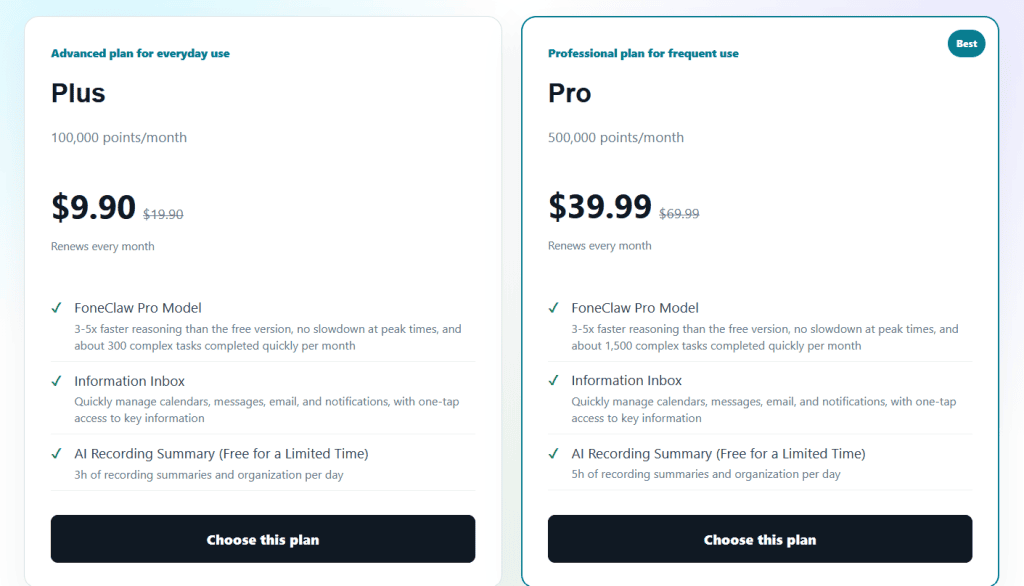
Check the official website at https://www.foneclaw.ai/ for the latest download information and supported options before installing.
Benefits and Limitations
The biggest advantage of FoneClaw is its focus on completing tasks instead of merely answering questions. Its phone controls, message summaries, device checks, and multi-step workflows could make everyday Android use more convenient.
The availability of different model options and publicly accessible project resources is another plus.
Still, it has limitations. FoneClaw is built for Android rather than iOS, and some functions require permissions or manual configuration. Its performance also depends on the selected AI model, the task, and the available tools.
Because it can access personal information and perform device actions, permissions deserve careful attention. Only grant the access you need, review approval settings, and check sensitive actions before allowing them to proceed.
Final Verdict: Is FoneClaw Worth Trying?
FoneClaw is an interesting option for Android users who want to move beyond ordinary AI chat and automate practical phone tasks.
Its ability to summarize messages, check device status, control supported settings, and connect multiple actions makes it worth exploring. The free core features also lower the barrier to trying it.
It may not be the perfect choice for someone who wants a completely hands-free experience with no setup. Some tasks still need permissions, configuration, and user review.
Overall, FoneClaw is worth a look if you enjoy experimenting with AI and want your phone to do more of the routine work. Start with simple tasks, understand the permission settings, and see how well it fits your daily routine.

