If you’ve ever built an AI application, you already know one thing. Writing prompts is only the beginning.
The real challenge comes later. Prompts change. Teams edit them. Developers test different versions. Someone accidentally overwrites the working prompt. Suddenly, the AI starts giving completely different answers, and nobody remembers what changed.
That problem is exactly what Promptman is trying to solve.
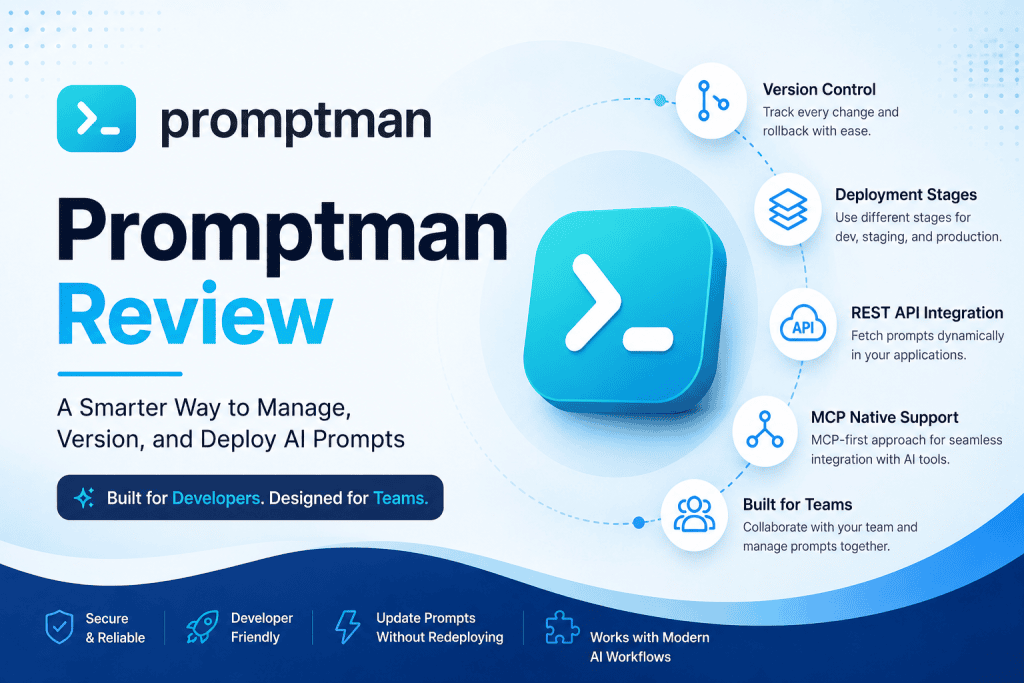
Instead of storing prompts inside source code or random documents, Promptman gives developers a dedicated platform where prompts can be managed just like software. Version history, deployment stages, APIs, and collaboration are all built into one dashboard. It’s a simple idea. But honestly, it’s one that makes a lot of sense as AI projects become bigger.
In this review, we’ll take a closer look at Promptman, its features, pricing, and whether it’s actually worth using.
What is Promptman?
Promptman is a prompt management platform designed for developers, AI startups, and teams building applications powered by large language models.
Rather than hardcoding prompts into an application, Promptman lets you store them in one central location and fetch them whenever your application needs them. That means updating prompts doesn’t always require changing your code or redeploying the whole application. It’s faster. And much safer.
The platform also follows an MCP-first approach, making it easy for AI coding assistants and modern AI tools to work with prompts directly through the Model Context Protocol. That’s a feature many newer AI development workflows are beginning to adopt.
First Impressions
The website feels clean and focused. There aren’t dozens of confusing menus or unnecessary marketing buzzwords.
Everything revolves around one goal—making prompt management simple.
Whether you’re creating an AI customer support bot, an internal assistant, or an automation workflow, Promptman provides a structured place to organize your prompts.
For developers, that’s refreshing.
Key Features
1. Version Control for Prompts
This might be Promptman’s biggest advantage.
Every time a prompt changes, the platform records it. You can compare versions, view previous edits, and even roll back if something breaks.
Anyone who has copied prompts between Notion pages, GitHub files, or Google Docs knows how valuable this can be.
Instead of wondering which version actually worked, the history is already there.
2. Deployment Stages
Promptman lets you organize prompts into different deployment environments.
For example:
- Development
- Staging
- Production
This makes testing much safer.
You can experiment with new prompts in development while your production application continues using stable versions. Once you’re happy with the results, simply promote the prompt to the next stage.
It sounds simple. Yet it saves a surprising amount of time during development.
3. REST API Integration
Promptman offers a REST API that allows applications to fetch prompts dynamically.
Instead of embedding prompts directly into your codebase, your application requests the latest version from Promptman whenever needed.
That means prompt updates become much easier.
Need to improve a customer support response? Just update the prompt inside Promptman.
No redeployment.
No code edits.
Just update and continue working.
4. MCP Native Support
One feature that helps Promptman stand out is its native support for the Model Context Protocol (MCP).
As more AI development tools adopt MCP, developers can allow coding assistants to discover and manage prompts directly through Promptman’s server.
This makes Promptman feel future-ready rather than just another prompt storage platform.
5. Team Collaboration
Building AI products is rarely a one-person job. Promptman allows multiple team members to collaborate on prompts together.
Instead of passing prompt files through Slack or email, everyone works from the same source.
Less confusion. Less duplicated work. Better consistency across projects.
6. Built for AI Agents
Modern AI applications often involve autonomous agents rather than simple chatbots. Promptman was designed with this workflow in mind. Developers can update prompts without redeploying applications, making agent behavior easier to improve over time.
It’s a small detail, maybe. But one that becomes very useful once projects grow larger.
Pricing
Promptman keeps its pricing straightforward.
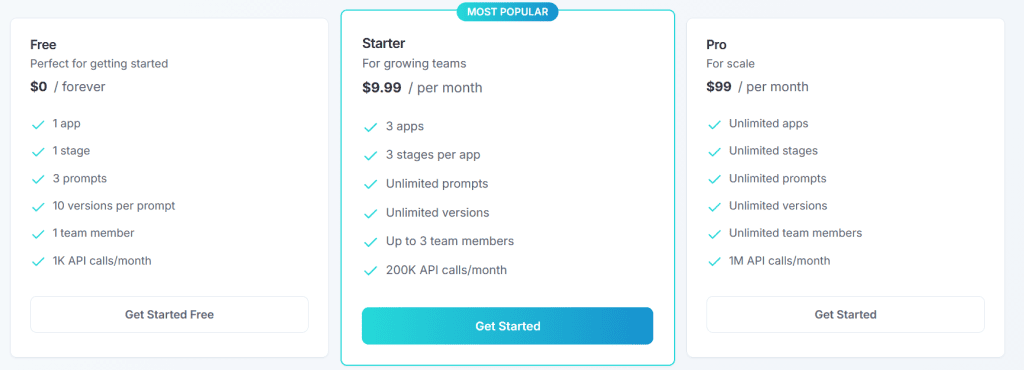
Free Plan — $0
The free plan is ideal for individuals learning the platform.
It includes:
- 1 app
- 1 stage
- 3 prompts
- 10 versions per prompt
- 1 team member
- 1,000 API calls each month
This is enough to experiment without spending anything.
Starter Plan — $9.99/month
The Starter plan targets small teams.
Features include:
- 3 apps
- 3 stages per app
- Unlimited prompts
- Unlimited prompt versions
- Up to 3 team members
- 200,000 API calls per month
For under ten dollars, it offers solid value if you’re actively building AI applications.
Pro Plan — $99/month
The Pro plan is built for larger organizations.
It provides:
- Unlimited apps
- Unlimited stages
- Unlimited prompts
- Unlimited versions
- Unlimited team members
- 1 million API calls every month
Companies running production AI systems will probably appreciate these higher limits.
Who Should Use Promptman?
Promptman isn’t really aimed at casual ChatGPT users.
Instead, it’s best suited for:
- AI startups
- SaaS companies
- Software developers
- Engineering teams
- Businesses deploying AI agents
- Organizations managing multiple AI applications
If you’re only saving a few prompts for personal use, this platform may feel like more than you need.
But once prompts become part of a production workflow, Promptman starts making a lot more sense.
Pros
- Clean and beginner-friendly interface
- Excellent prompt version control
- Built-in deployment stages
- REST API for runtime prompt fetching
- Native MCP support
- Easy collaboration for teams
- Transparent pricing
- Free plan available
Cons
- Mainly designed for developers rather than casual AI users
- Advanced API features may require some technical knowledge
- Free plan has limited prompt capacity
None of these are major drawbacks. They simply reflect the audience Promptman is built for.
Final Verdict
Prompt engineering has quickly become a core part of AI development. Yet many teams still manage prompts using text files, spreadsheets, or scattered documentation.
That approach works…until it doesn’t.
Promptman offers a much more organized solution. With version control, deployment stages, API access, MCP integration, and collaboration tools, it treats prompts like real software assets instead of disposable text snippets.
The pricing is fair, especially the $9.99 Starter plan, which includes unlimited prompts and generous API limits. The free plan also gives new users a chance to explore the platform before committing.
Overall, Promptman is a practical choice for developers and teams building AI-powered products. It won’t magically improve your prompts overnight. But it will make managing them much easier. And sometimes, that’s exactly what’s needed.

