If you use more than one AI model, you already know the problem: one tool may be better at writing, another at coding, and another at research. Switching between separate subscriptions gets expensive and, more importantly, breaks your workflow.
Sparkian takes a different approach. It brings 50+ AI models from providers such as OpenAI, Anthropic, and Google into one workspace, while also adding web research, image generation, file handling, and collaboration features.
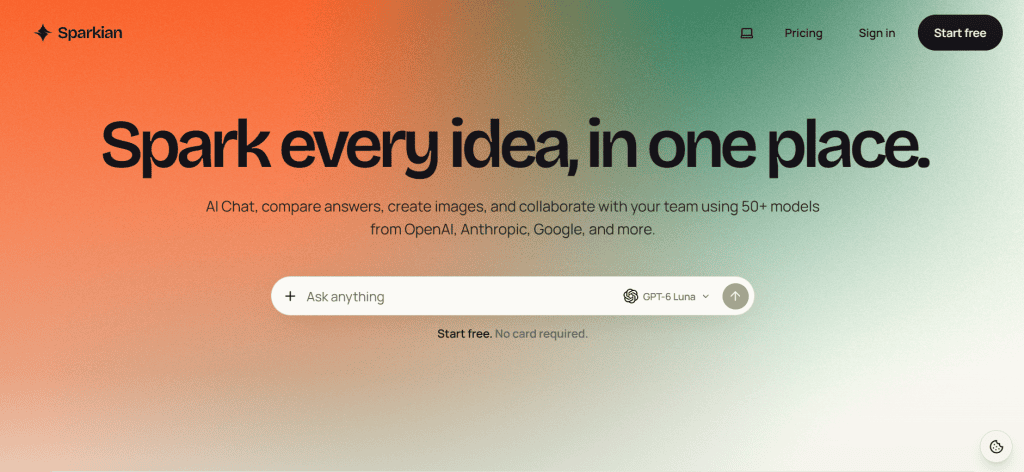
But having many models in one place doesn’t automatically make a service worthwhile. The bigger questions are how Sparkian handles those models, how its credit system works, and whether the convenience justifies the cost.
Here is a closer look at what Sparkian offers and who should consider using it.
What Is Sparkian?
Sparkian is a multi-model AI workspace developed by Geekflare. Rather than subscribing separately to several AI platforms, users can access different models from a single interface.
The platform supports more than 50 models and allows users to switch models while keeping the conversation, files, and context in place. You can also send the same prompt to multiple models and compare their responses side by side.
That comparison feature is particularly useful when you’re working on something where the first answer isn’t necessarily the best answer. For example, you can ask several models to review a piece of content, analyze an idea, or suggest approaches to a coding problem and then continue with the response you prefer.
Sparkian also includes web search, URL reading, knowledge-base capabilities, image generation, and shared workspaces.
Key Features
1. Multiple AI models in one place
The biggest selling point is model choice.
Instead of being locked into one AI provider, you can work with models from different providers within the same workspace. Sparkian currently positions itself around 50+ models from companies including OpenAI, Anthropic, and Google.
This can be useful for professionals who routinely compare outputs rather than depending on a single model.
2. Compare responses side by side
Sparkian lets you send a prompt to multiple models and view their answers alongside each other. You can then choose the response you prefer and continue working from there.
You can also compare an existing response with another model without starting the entire process again.
For research, content creation, brainstorming, and technical work, this is one of the more practical features because it removes a lot of copy-and-paste work.
3. Web research and URL reading
Sparkian can automatically use web search when a question requires current information. You can also provide a specific URL and have the platform read the page.
That makes it more useful for tasks where the model’s built-in knowledge isn’t enough, such as researching current products, companies, market developments, or recently published information.
3. Image generation
Image generation is available directly inside the conversation. Users can select an image-capable model or activate the image-generation tool.
Sparkian supports different image sizes and quality settings, and users can generate up to four images at once. Generated images can also be reused as references for subsequent edits.
For marketers and content creators, keeping text and image creation in the same workspace can be convenient.
How Does Sparkian’s Pricing Work?
This is where Sparkian differs from the traditional AI subscription model.
Instead of simply giving you unlimited access to every model, Sparkian uses Sparks, which are usage credits. Each request consumes a certain number of Sparks depending on the model and the amount of content being processed.
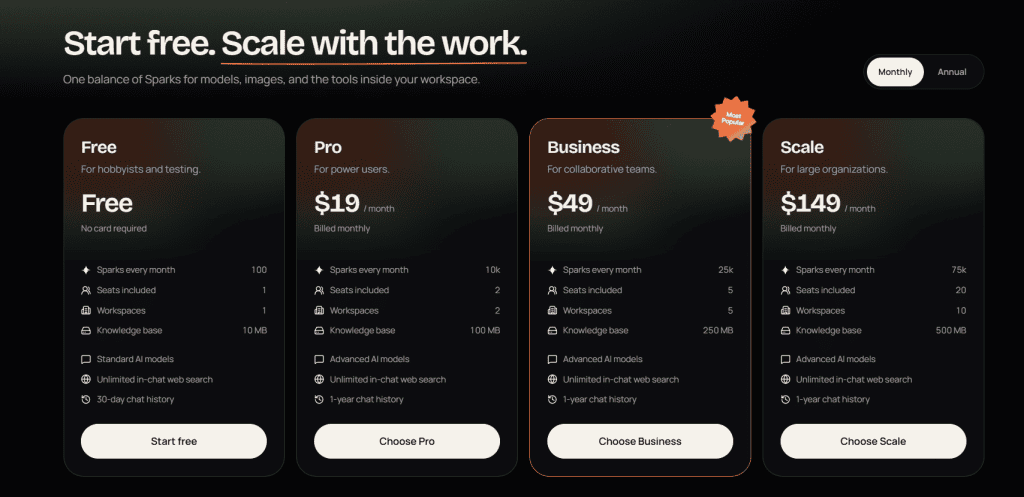
The current plans listed by Sparkian are:
| Plan | Price | Monthly Sparks | Seats |
|---|---|---|---|
| Free | $0 | 100 | 1 |
| Pro | $19/month | 10,000 | 2 |
| Business | $49/month | 25,000 | 5 |
| Scale | $149/month | 75,000 | 20 |
The Free plan doesn’t require a payment card. Paid plans add larger Spark allowances, advanced models, more workspace capacity, longer chat history, and additional file capabilities.
One detail worth understanding is that unused monthly Sparks don’t roll over. If you need more before your allowance refreshes, Sparkian also sells one-time Spark top-ups.
The Spark System: A Potential Advantage and Drawback
The credit model makes the pricing relatively transparent because Sparkian shows an estimated cost for a request before you send it.
However, the final cost isn’t always fixed. A simple request can cost close to the displayed estimate, while a long conversation, large attachment, or lengthy response can consume more Sparks.
This means heavy users should pay attention to consumption rather than assuming that a $19 subscription automatically means unlimited use of advanced models.
Long conversations can also become more expensive because the system may need to process more previous context. Sparkian warns users when a conversation reaches around 20,000 tokens.
Who Should Use Sparkian?
Sparkian makes the most sense for people who actually benefit from using multiple AI models.
Content writers, marketers, developers, researchers, consultants, and small teams are among the obvious use cases. Someone researching a topic, for example, can compare answers from different models without opening several browser tabs.
It can also make sense for businesses that want shared workspaces. Paid plans include multiple seats and workspaces, while team members can work with shared projects and context.
For a casual user who only wants one AI assistant for occasional questions, however, Sparkian may offer more functionality than necessary.
What Are the Downsides?
The Sparks system is probably the biggest thing to understand before subscribing.
You aren’t simply buying unlimited access to every model. Your usage comes from a monthly credit pool, and expensive models can consume substantially more Sparks than lightweight ones.
There is also another consideration: Sparkian connects to third-party AI providers. According to its terms, prompts, relevant uploads, and related data may be transmitted to the provider responsible for the selected model, and provider terms vary.
For confidential business information, users should therefore understand the applicable provider and workspace terms before uploading sensitive material.
Final Verdict
Sparkian is an interesting option for people who want access to multiple AI models without maintaining several separate AI subscriptions.
Its strongest feature isn’t simply the number of models. The real advantage is the workflow: compare different responses, switch models without losing context, research the web, work with files, and generate images from one place.
The main caveat is the Sparks system. Heavy users should monitor their consumption and understand how longer conversations and more demanding models affect usage.
For someone who regularly works with several AI models, Sparkian is worth trying—especially because the Free plan provides 100 Sparks each month without requiring a payment card.

