Paperwork has never been anyone’s favorite job.
You print a contract. Sign it. Scan it. Send it by email. Then wait. Sometimes the other person forgets to sign. Sometimes they print it again. The whole process becomes slow for something that should only take a few minutes.
That’s why electronic signature tools have become so popular.
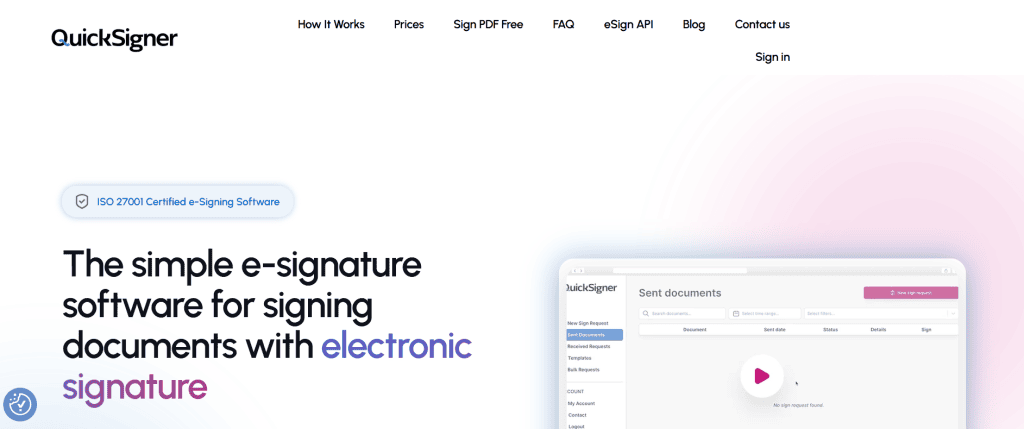
Among the many options available today, QuickSigner stands out because it focuses on doing one thing really well—making document signing easy, secure, and affordable. It doesn’t try to overwhelm users with features they may never use. Instead, it offers a clean experience that works for freelancers, small businesses, and growing teams.
After exploring the platform, here’s my honest review.
What is QuickSigner?
QuickSigner is a cloud-based electronic signature platform that lets you upload documents, request signatures, and track the entire signing process online. The platform supports PDF and Word documents and produces legally binding electronic signatures that comply with recognized standards. Signed documents include an audit trail and Adobe-certified PAdES signatures, while the service is built on ISO/IEC 27001:2022-certified infrastructure for security.
The biggest selling point?
The people signing your documents don’t need to install an app or even create an account.
They simply receive an email, click the secure link, sign the document, and they’re done. Simple.
First Impressions
The first thing I noticed was the clean interface.
Some e-signature platforms feel complicated from the very beginning. There are dozens of menus, advanced settings, and confusing workflows.
QuickSigner feels different.
Everything is straightforward. Upload your document, choose who should sign it, place the signature fields, and send it.
That’s pretty much it. For busy business owners, that’s exactly what you want.
How QuickSigner Works
The entire signing process follows four simple steps.
1. Upload Your Document
Start by uploading a PDF or Word file.
It could be a contract, NDA, invoice, offer letter, agreement, or almost any document that requires signatures.
2. Add Signers and Signature Fields
Next, enter the email addresses of everyone who needs to sign.
Then drag signature, date, text, initials, or checkbox fields onto the document exactly where they’re needed. No complicated setup. Just drag and drop.
3. Send Secure Signing Links
Each signer receives a secure email link. They open it on their phone, tablet, or computer and sign directly in the browser. No software. No downloads. No account creation.
That alone removes a lot of frustration.
4. Track Progress
Once the documents are sent, you can monitor every step.
You’ll know who has signed and who is still waiting. When everyone completes the process, the final signed document becomes available with a complete audit trail.
Features That Make QuickSigner Stand Out
Legally Binding Electronic Signatures
QuickSigner creates legally binding electronic signatures using Adobe-certified PAdES technology.
Every signed document also includes a timestamp and detailed audit trail, helping businesses prove exactly who signed and when.
Strong Security
Security matters when contracts are involved.
QuickSigner encrypts documents using TLS 1.3 during transfer and AES-256 encryption while stored. It also operates on ISO/IEC 27001:2022-certified infrastructure and is designed with GDPR requirements in mind.
That gives businesses some extra peace of mind.
Multiple Signers
Many agreements require more than one signature.
QuickSigner allows multiple recipients in a single signing request. Paid plans support larger signing groups and even let you define the signing order.
Templates
If you repeatedly send the same documents, templates can save a lot of time.
Instead of creating every document from scratch, simply reuse an existing template and send it again.
Small feature.
Big time saver.
API Integration
Developers can integrate QuickSigner into their own software using its eSign API.
This makes it possible to automate document signing directly inside business applications without sending users somewhere else. API pricing starts after included credits on the Professional plan.
Bulk Sending
Need to send contracts to many people?
The Professional plan includes bulk sending, making it useful for HR departments, sales teams, and businesses handling larger document volumes.
Pricing
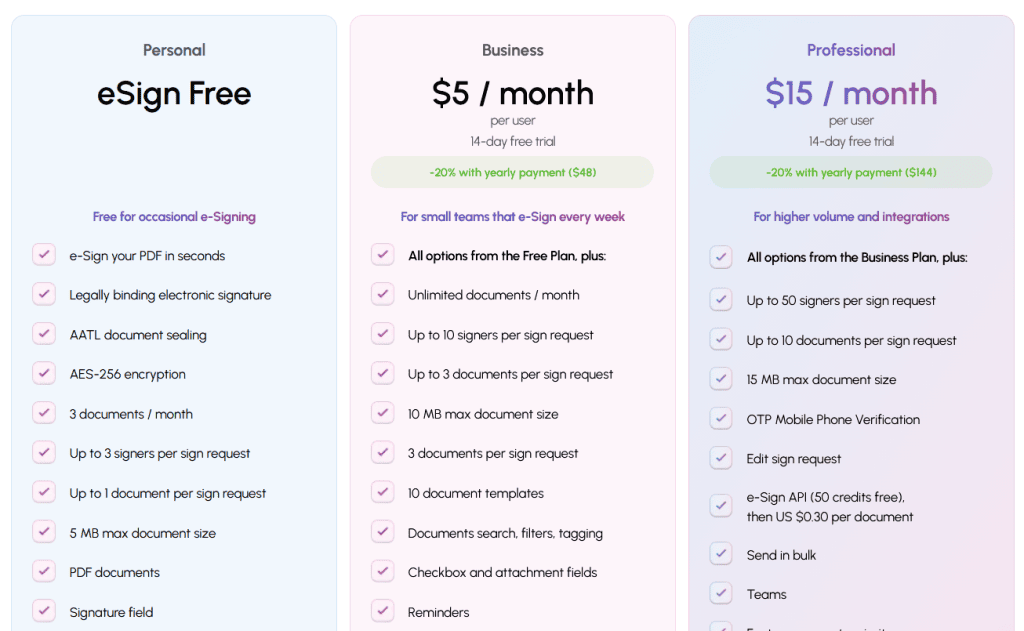
One thing I really liked is the pricing.
It’s refreshingly simple.
Free Plan
The Personal plan costs nothing.
It includes:
- 3 documents each month
- Up to 3 signers
- One document per request
- PDF support
- Signature and stamp fields
- AES-256 encryption
Perfect for occasional users.
Business Plan – $5/User/Month
This plan is aimed at small businesses.
It includes:
- Unlimited documents
- Up to 10 signers
- Word document support
- Templates
- Document search
- Reminders
- Saved signatures
- Signing order
- 14-day free trial
Annual billing reduces the cost to $48 per year per user.
Professional Plan – $15/User/Month
Businesses with higher signing volumes receive:
- Up to 50 signers
- Bulk sending
- Teams
- API access
- OTP mobile verification
- Priority support
- Larger document limits
Annual pricing drops to $144 per user.
Who Should Use QuickSigner?
QuickSigner works well for:
- Freelancers
- Small businesses
- Sales teams
- HR departments
- Legal professionals
- Agencies
- Consultants
- SaaS companies
Basically, anyone who regularly sends contracts or agreements.
If you only sign one document every few months, the free plan may already be enough.
Pros
- Very easy to use
- Affordable pricing
- Free plan available
- Unlimited documents on paid plans
- Legally binding electronic signatures
- Strong security and encryption
- No account required for signers
Cons
- Advanced automation features are only available in higher plans.
- Enterprise-level customization is more limited than some large competitors.
None of these are deal breakers. For most small and medium-sized businesses, the available features are more than enough.
Final Verdict
QuickSigner proves that electronic signatures don’t have to be expensive or complicated.
It focuses on what businesses actually need: fast document signing, strong security, legal compliance, and fair pricing. The simple four-step workflow, unlimited documents on paid plans, and no-account signing experience make it an attractive alternative to larger e-signature platforms.
What impressed me most was its balance. It keeps the interface clean while still offering practical features like templates, signing order, bulk sending, and API integration for growing businesses. If you’re searching for an affordable electronic signature solution that is easy to learn and reliable in daily use, QuickSigner is definitely worth considering.

